


Booking.com is an online travel agency that connects travelers with accommodations, flights, and car rentals. If you are new to the platform or looking to maximize value, this Booking.com guide shows you how to use flexible search tools, manage bookings through one account, and analyze reviews from completed stays.
While Genius discounts can make eligible stays less expensive, the final price still deserves a careful look. This guide details how the system works, what Genius offers, and what to check before you pay to avoid costly mistakes.
This post may contain affiliate links. If you make a purchase through these links, I may earn a small commission at no extra cost to you.
Key Takeaways
- Compare dates, room types, and cancellation terms before choosing the lowest displayed rate.
- Genius offers account-linked discounts on eligible stays and rental cars, but savings apply before taxes and fees. See Booking.com’s Genius program for current benefits.
- Confirm whether the displayed price includes taxes, charges, resort fees, or other costs before entering payment details.
- Read the property’s cancellation and no-show rules carefully. Deadlines and penalties vary, as explained in Booking.com’s customer terms.
- Save your confirmation email, then verify the dates, guests, room type, payment schedule, and cancellation deadline.
What Is Booking.com and What Can You Book?
Booking.com is an online travel marketplace where you can compare and reserve accommodations, flights, and rental cars. For a US trip, that might mean booking a hotel in Orlando, a flight from Chicago, and a car waiting at the airport without opening three separate travel websites.
You can keep those reservations under one account and manage them through the Booking.com website or mobile app. That makes it easier to find confirmation details, check travel dates, and review cancellation information when your plans change.
Hotels, Vacation Rentals, Flights, and Rental Cars in One Account
Booking.com includes hotels, apartments, homes, short-term rentals, flights, and rental cars. These alternative accommodations may be managed by individual vacation rental hosts or larger businesses. A family visiting San Diego could reserve a vacation rental, book flights for four travelers, and arrange an airport car rental in the same trip-planning session.
That convenience has limits. Each booking can have different payment schedules, cancellation rules, baggage allowances, mileage restrictions, deposits, and check-in requirements. A property manager or hotel manager may set availability, deposits, check-in rules, and cancellation conditions for a property.
Provider-side clarification: Providers may use the Booking.com extranet or a connected channel manager to update rates and availability. Accurate photos, amenities, and policies also support listing optimization. Providers may account for commission fees when setting rates, but this isn’t automatically a separate fee charged to travelers. Review your confirmation to catch issues such as double bookings.

Booking.com helps arrange the reservation, but it usually isn’t the company providing the room, flight, or car. Think of it as the booking counter, not the front desk, airline crew, or rental-car agent.
Why Reviews, Ratings, and Property Details Matter
Guest reviews give you useful clues before you commit. Look for recent comments about cleanliness, location, staff, comfort, noise, parking, and recurring problems. Booking.com says reviews come from guests who made a booking and stayed at the property, and it promotes a very large base of verified guest reviews. You can read more about how Booking.com guest reviews work.
Still, a high score doesn’t replace the details. Check the exact room type, bed arrangement, view, accessibility features, and included amenities. For flights, confirm baggage rules and layovers. For rental cars, review the vehicle category, pickup location, damage deposit, fuel policy, insurance terms, and mileage limits.
Before paying, compare the final price. Taxes, service charges, resort fees, cleaning fees, deposits, and other costs may not appear in the first attractive number you see. The cheapest rate is only useful if you understand what it includes.
How to Find Better Prices on Booking.com
Finding a lower Booking.com price takes more than sorting from cheapest to most expensive. Start with the destination, dates, number of guests, and room requirements, then narrow the results using a budget limit, property type, guest rating, breakfast, parking, and free cancellation when available.
Dynamic pricing means rates can change with dates, demand, and availability. Compare hotels with alternative accommodations, such as apartments or vacation rentals, when they suit your plans. Also compare the available options, including refundable, nonrefundable, and breakfast-included rates.
Use the map view before choosing a property. A cheaper hotel several miles outside your preferred area may end up costing more once you add rideshares, parking, or extra travel time. Also compare the final total, not just the first price displayed. Taxes, fees, deposits, resort charges, cleaning fees, baggage, and other extras can change the real cost.
Hotel managers and connected inventory systems may update availability, rate plans, and instant booking status. Verify the current details before entering payment information.
Ready to Plan Your Next Budget Trip?
Put this guide into practice and start comparing thousands of accommodations, flights, and car rentals worldwide right now.
Find Deals on Booking.com
Use Filters Without Missing Important Tradeoffs
Filters save time, especially when a destination has hundreds of listings. They can also hide the reason one option costs less. A budget hotel may have a weaker location, fewer amenities, no breakfast, limited parking, or stricter cancellation terms.
After filtering, compare what each rate includes:
- A free-cancellation room may cost more than a non-refundable rate.
- Breakfast and parking can be worth paying for if you were to purchase them separately.
- A lower nightly price may come with a deposit, resort charge, or cleaning fee.
- Provider and platform economics may be reflected in the listed price, including commission fees, so compare the final payable total rather than assuming a separate charge.
- A high guest rating does not help much if the property is inconvenient for your plans.
At checkout, check the payment methods to confirm whether you’ll pay online, at the property, or through another supported option. Enter credit card details only after confirming the rate, provider, and terms. Review the cancellation policy for the applicable deadline and penalties.
Read the full rate conditions before selecting a room. Booking.com’s tax and fee guidance explains that the price description indicates whether these costs are included or excluded. If you use Genius, remember that the discount applies to eligible stays and rental cars before taxes and fees, so compare the final totals rather than trusting the percentage alone.
Compare Flight Options Carefully
Booking.com puts flights in the same travel ecosystem, but flight terms still depend on the airline and itinerary. A convenient-looking fare may have limited baggage, a long connection, an airport change, or separate tickets that require you to manage more of the trip yourself.
Before paying, check:
- The baggage allowance and fees for every airline.
- Whether you must change airports during the connection.
- The connection time and whether you need to collect and recheck luggage.
- Which airline owns each ticket or itinerary?
- Who handles changes, delays, cancellations, and refunds?
Mixed-airline, self-transfer, and separate-ticket options may appear in current search results, but don’t assume they have the same protection as one airline-issued itinerary. The payment processor may differ from the provider handling the reservation. Review the airline’s carriage contract and cancellation rules in the booking details, since Booking.com’s customer terms state that airline policies control flight changes and cancellations.
Booking.com Genius Rewards and Other Useful Benefits
Booking.com Genius is free once you create an account or sign in. The program can reduce the cost of some stays and rental cars, but savings apply only when the specific listing participates.

How Genius Eligibility and Discounts Work
Genius has three levels. Level 1 offers 10% off select stays and rental cars. Level 2 offers 10% to 15% off eligible stays and rental cars. Level 3 offers 10% to 20% off select stays, while rental-car discounts may have a lower range. Booking.com applies these discounts before taxes and fees.
The same basic rule applies to rental cars, although discounts depend on your level and selected vehicle rentals. Savings and perks can also vary by the chosen room or vehicle rate plans. The official Genius program details show that benefits are limited to selected stays and rental cars, not every reservation on the website.
Partner guidance describes qualifying properties as having at least three reviews and a review score of at least 7.5. Those are partner eligibility rules, not a promise that every highly rated property participates. Hotel managers or property operators decide which inventory and benefits they make available within the program’s rules.
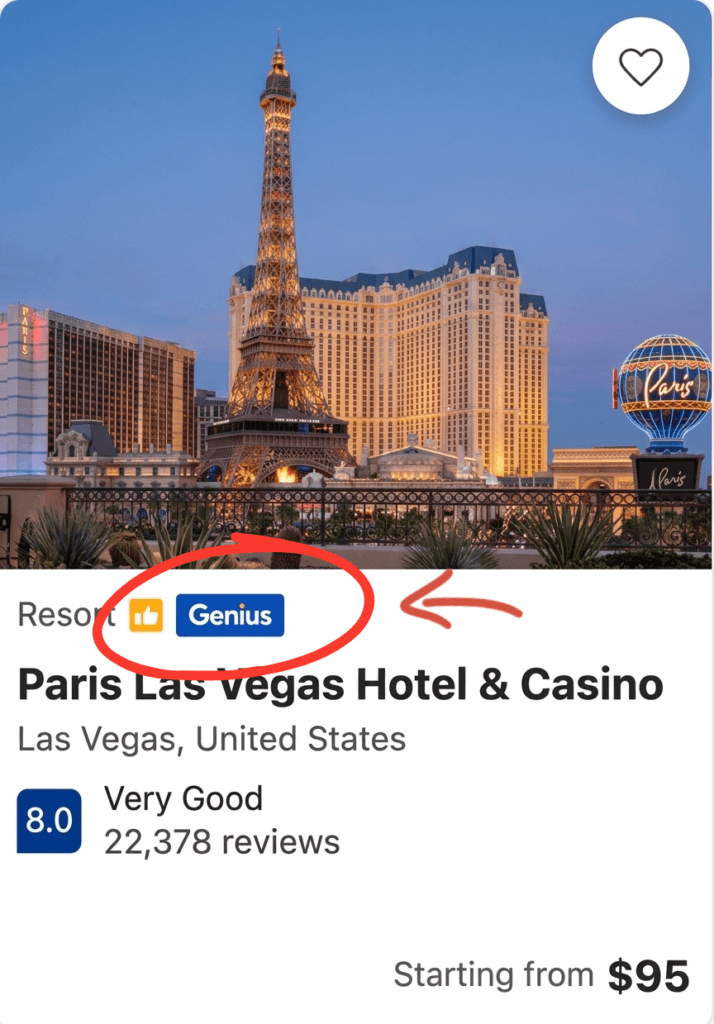
Look for the Genius label on the listing, then confirm the discounted total after choosing your room, dates, and guests. Higher-level perks, including breakfast, room upgrades, and priority support, also depend on the listing and booking. They aren’t automatic rewards for every Genius reservation.
When Loyalty Savings Are Worth Using
Genius is useful when it lowers the final price without taking away something you need. Compare the discounted Booking.com total with similar listings and direct bookings from the property before deciding.
Dynamic pricing can make marketplace and property prices differ by date, demand, available inventory, or booking conditions. A provider’s platform costs, including commission fees, may also be reflected in its rate. The discount percentage alone isn’t a reliable measure of savings.
A larger discount percentage doesn’t always mean a cheaper reservation. Room categories, taxes, resort fees, breakfast, parking, deposits, and cancellation terms can all differ. A 15% discount on a stricter room may be less useful than a smaller discount on a refundable rate.
Check these details side by side:
- The total price after taxes and fees.
- The exact room or vehicle category.
- Breakfast, parking, and other included extras.
- The cancellation deadline and no-show penalty.
- Whether the property’s own rate includes a better benefit.
The useful number is the amount you will actually pay for the booking you want. The label is only the starting point.
The Main Pros, Limits, and Booking Risks to Understand
Booking.com is convenient because you can compare hotels, flights, and rental cars in one place. Filters, reviews, Genius discounts, and a single app make trip planning easier. The tradeoff is that each provider can set different prices, policies, payment schedules, deposits, and support rules.
A Simple Checklist Before You Confirm
Before you enter your payment details, check the booking as if you were checking a suitcase. Small mistakes are much easier to fix before confirmation.
- Confirm the travel dates, number of guests, passenger details, and guest names.
- Inspect the full price, including taxes, service charges, resort fees, cleaning fees, damage deposit, and other costs payable under the property’s terms.
- Before submitting your credit card details, verify the final amount and payment schedule.
- Read the cancellation policy, no-show deadline, and refund conditions. A free-cancellation deadline isn’t the same as a flexible booking forever.
- Confirm baggage allowances for flights, plus vehicle requirements, mileage limits, fuel rules, deposits, and pickup details for rental cars.
- Check the property’s address, phone number, check-in instructions, airport location, or rental counter details.
- Read recent guest feedback for recurring issues with noise, cleanliness, parking, access, or misleading listing details.
- If you selected an instant booking, confirm that the reservation is actually confirmed rather than merely submitted or awaiting provider approval.
- Save the confirmation email and confirmation number somewhere you can reach without opening the app.

Booking.com says accommodation cancellation fees are set by the property and shown in the booking policy. If a problem involves a hotel, airline, or rental company, use Booking.com’s customer service and the provider’s contact information in your confirmation.
Who Should Use Booking.com and Who Should Compare More Options
Booking.com suits travelers who want a broad selection and fewer tabs open. You can compare many providers, filter by price and amenities, manage trip details in one account, and find eligible discounts when they offer genuine savings.
Availability can also depend on provider systems. A property may update rooms through the Booking.com extranet or a channel manager, and delays can create double bookings. Save your confirmation and contact support quickly if the reservation details conflict.
Extra comparison makes sense when the booking is complicated. Check the airline directly for complex flights, separate tickets, tight connections, or strict refund needs. Compare the hotel’s own website when you need a special room request, chain loyalty points, elite benefits, or better refund terms.
Direct bookings may make it easier to discuss property-specific requests with hotel managers. A direct rate and a marketplace rate may also reflect different commission fees, so compare the complete terms rather than assuming one channel is always cheaper.
Rental cars deserve a close look when deposits, insurance, mileage limits, or cancellation fees are high. Travelers with unusual needs may also compare alternative accommodations, such as apartments or vacation rentals. The headline price may look attractive, but the amount charged at pickup can tell a different story. Read the Booking.com customer terms, then compare the complete booking rather than the first number on the screen.
Frequently Asked Questions
A few questions usually appear after you compare prices and read the booking terms. These answers cover changes, payment timing, guest details, and problems that can happen after you reserve.

Can I change my Booking.com reservation after paying?
You may be able to change the dates, room type, guest details, or check-in information through your confirmation email or Booking.com account. The available options depend on the property’s policy, availability, and the type of rate you booked. Check the revised price before confirming the change, since a new date or room may cost more. Booking.com’s customer service page lists the changes available for eligible reservations.
When will Booking.com charge my card?
There isn’t one payment schedule for every Booking.com reservation. The property or travel provider may use a different payment processor and charge you at booking, later before arrival, or at the property. Your confirmation email should state the payment methods and payment due date. It should also explain whether the card only guarantees the reservation and whether commission fees are included in the supplier arrangement or displayed rate rather than added unexpectedly.
Can I change the guest name on a reservation?
Guest name changes aren’t always possible, especially for flights or reservations with strict identification rules. Booking.com’s help guidance says personal details such as the guest’s name or email address may not be editable after booking. Contact the property and Booking.com before arrival if someone else needs to use the reservation, rather than simply changing the name on a document.
What should I do if the property can’t find my reservation?
Show the property your confirmation number, guest name, dates, and room details. Check that you contacted the correct location, since hotels can have similar names in the same city. If the property still can’t locate the booking, contact Booking.com’s customer support through the app, website, or confirmation email before paying for another room.
What happens if the hotel is overbooked?
Contact the property and Booking.com as soon as you learn there is no room available. Ask for written details about the replacement accommodation, transportation, price difference, and any other costs before leaving the original property. Keep receipts for reasonable expenses, since they may be needed when requesting help or reimbursement under the applicable booking arrangements.
A Simple Checklist Before You Confirm
By providing access to stays, flights, and rental cars in one location, this Booking.com guide shows how the platform can simplify trip planning. Its broad selection and useful filters make it a strong starting point when comparing options without opening a dozen tabs.
The first price isn’t always the final price. Compare the complete total, then check payment, cancellation, baggage, deposit, and refund terms before confirming. A few minutes at checkout can prevent a much bigger problem later.
Don’t Leave Your Trip to Chance
You’ve got the guide—now avoid costly mistakes and secure your ideal itinerary. Ready to lock in your next perfect stay, flight, or car rental with confidence?
Apply This Guide & Book Now